Over a 5-week sprint, I redesigned Viata's mobile UI to support the launch of their homebuyer tool, reducing route input frustration by 60%.
context
Role
UX Designer
Team
Me
Lead Designer
Engineers
Skills
Prototyping User Research
Feature Scoping
Timeframe
Apr 2024 - May 2024
(5 weeks, 10 hrs/wk)
overview
Small screens, big homebuyer needs
When Viata (fka Traffigram) prepared to launch its homebuyer tool, we found that our mobile experience was an afterthought, and the features offered did not meet homebuyers needs.

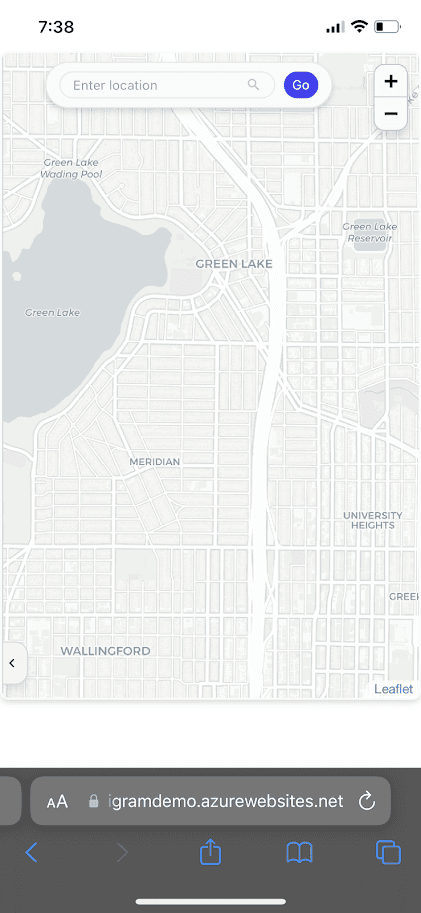
80% of users during early testing noted frustration around navigation and inputs on mobile.
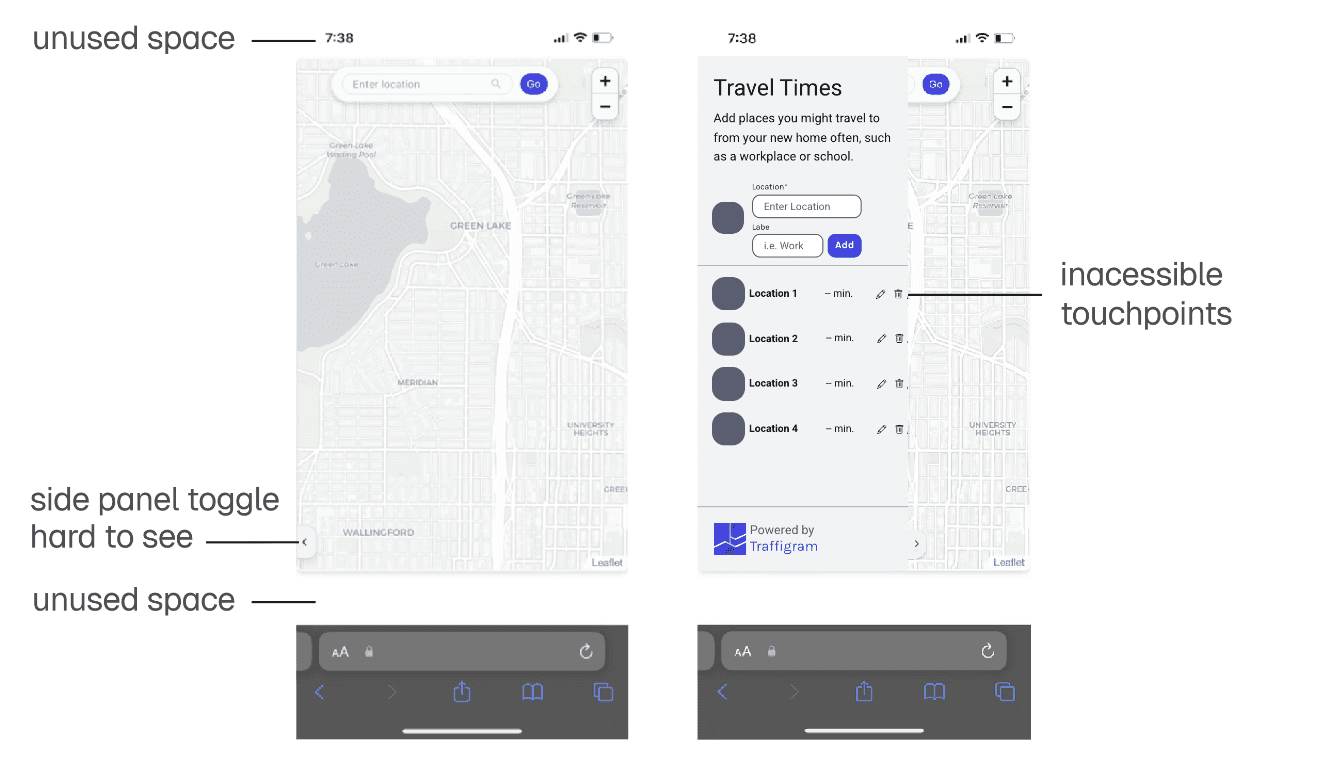
Our UI was preventing homebuyers from making complex and nuanced decisions on potential homes due to poor information architecture and improper feature scoping.
BackGround
Visualizing spatial accessibility at a glance
Viata's novel algorithm distorts maps based around travel time instead of travel distance, enabling users to make split-second travel decisions when considering multiple destinations at once. Instead of showing pure distance, Viata shows users how reachable these locations are.
Viata distorts a map to visually show the travel times to four different pizza restaurants from an origin point. While our desktop experience was sound, our mobile experience needed work.
For homebuyers, this means seeing all potential commutes visualized at a glance, but doing so with intuitive UI and without this lengthy explanation.
problems
Without clear hierarchy, Viata's core differentiator disappeared
While software like Google and Apple maps are designed for routing from Point A to Point B, Viata visualizes how Point A connects to everywhere I need to go. The main challenge became balancing previously established user flows from other mapping software while integrating features that highlight what makes Viata truly special.
With so many possible attributes to include, I had to rigorously scope and categorize features that best supported homebuyers.
My first iteration moved everything to a bottom panel, but rapid user testing showed that it failed. The map still felt cramped, and 80% of users reported frustration in adding and navigating locations.
My initial designs assumed that users always wanted their origin location in view, and that the map itself was the most important feature.
Splitting into tabs segmented by function
After talking to 10 prospective homebuyers from the Seattle area and auditing other platforms like Redfin, Zillow, and more, I discovered that maps were used as a lens that gave space and position to other attributes. Cramming too much into one panel meant that important information got lost.
This audit led me to explore grouping segmenting features by user intent, making use of tabs to group information neatly and free up map space.
Home input
Grounding users with a home panel
My user testing showed me that 70% of users set a home address once per session, instead of toggling between multiple prospective properties like I initially thought. Segmenting between home and commutes matched users mental models.
Home panel displays commuting information from a given home address, as well as an overview of its relationship to saved locations.
Giving the home address its own panel section freed up map space and gave me the opportunity to contextualize the section, adding in data like the average commute, walkability, and access to transit.
location search
Keeping location searching familiar
When redesigning location management, I gave users the chance to explore and confirm locations visually before adding them to their saved list. By progressively disclosing information, I was able to keep the process intuitive while emphasizing Viata-specific features.
Saved locations are now stored in a horizontal container, which decreased error rate in finding POI's by 75%.
Reducing input friction through nudges and interactions
For new users on the app, I provided friendly suggestions for potential locations of interest to reduce search inertia. For returning users, I streamlined editing locations through a long press interaction.
Locations panel provides suggestions to get users started. During user testing, I observed 40% of users hesitate to decide their first commute.
Editing locations is streamlined through a long press interaction.
Splitting up the information this way gave the interface room to breathe, resulting in significant reduction in cognitive overload and frustration during follow-up testing.
Time Features
Capturing when, not just where
Another huge benefit of Viata over other software is its ability to quickly show how departure times affect your commutes at scale. Homebuyers don't just care about perfect traffic conditions, but also about how time of day affects their travel. I made time inputs much more visible because of this.
Toggling rush hour traffic shows worst case scenarios when commuting.
For more fine-tuning, users can also set a time and day of the week on the map, which came up as a desired feature during initial testing.
Impact
Optimizing for user adoption
After bringing in 10 more homebuyers to run usability testing on my new designs, users reported significant decreases in confusion and frustration.
80%
⬅
20%
decrease of 60% in user frustration between rounds of testing.
400+
unique users in our one-month
open tool demo with this new redesign.
Reflection
Navigating unfamiliarity in product design
Working on a tool this novel gave me the chance to experiment and rapidly grow as a designer throughout this project.
Getting comfortable with brainstorming (no matter how out of the box it was), creating quick mockups and iterating with fast turnaround times was something I very quickly got used to. By focusing more on the functionality and usability of my designs, I was able to find the most optimal solution and then really fine-tune the details.
Looking back, I would have tested with real homebuyer data ASAP. Not using data early made it difficult to actually visualize the power of the tool I was working on, and also made it frustrating during early testing.